Subscriptions and Contracts
Billing in HerdPlan is managed through two concepts:
A subscription which is used to manage payment details with our payment provider, Stripe.
Contracts which are used to manage billing for individual Farms or Townships.
This separation is important, as it means HerdPlan:
Does not manage, keep, or handle any payment information such as Card details.
Can bill by usage (i.e. number of clients) in a flexible way.
Client Contracts
How contracts work
When a client is added to a practice it creates a contract within HerdPlan.
Each Farm or Township in the Practice has its own contract, representing the agreement between the Practice and the Farm.
A contract is initially in a Pending state.
At this time the contract is in a 14-day cooling-off period, and it can be Cancelled without incurring any charges.
At the end of this period, the contract becomes Active.
A contract covers a 12-month subscription to HerdPlan for the Farm
Contract payments can be taken monthly, or as a single payment.
The remaining balance of a contract can be paid at any time.
At the end of the 12-month contract period, the contract is Ended.
A contract can be Proposed either when awaiting Renewal, or if a Farm has changed Practice during the period.
Contract State
You can view the state of any Client contract by clicking on the Contract button in the active client list.
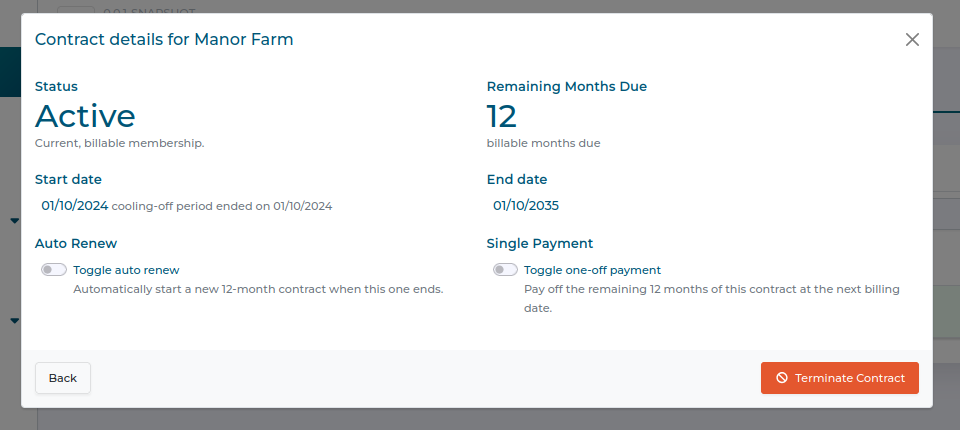
In the example above we can see:
Manor Farm has an Active contract with the Practice
The contract is valid for another 12 months
The contract will not automatically renew at the end of the period (this can be changed with the Auto renew toggle)
Payments for this contract will be taken monthly (this can be changed by setting the single payment toggle, which bills all remaining payments at the next invoice)
The contract can be terminated using the Terminate Contract button.